
iCON Touch 8 — a USB audio interface with a built-in 10-inch touchscreen
Maxim Liadov
iCON Pro Audio has introduced the Touch 8 USB-C audio interface with a 10-inch touchscreen for metering, faders and buttons. The number 8 probably refers to its 4 × 4 analogue input/output configuration. ADAT adds 8 input and 8 output channels, giving a total of 12 inputs and 12 outputs across the analogue and digital connections.
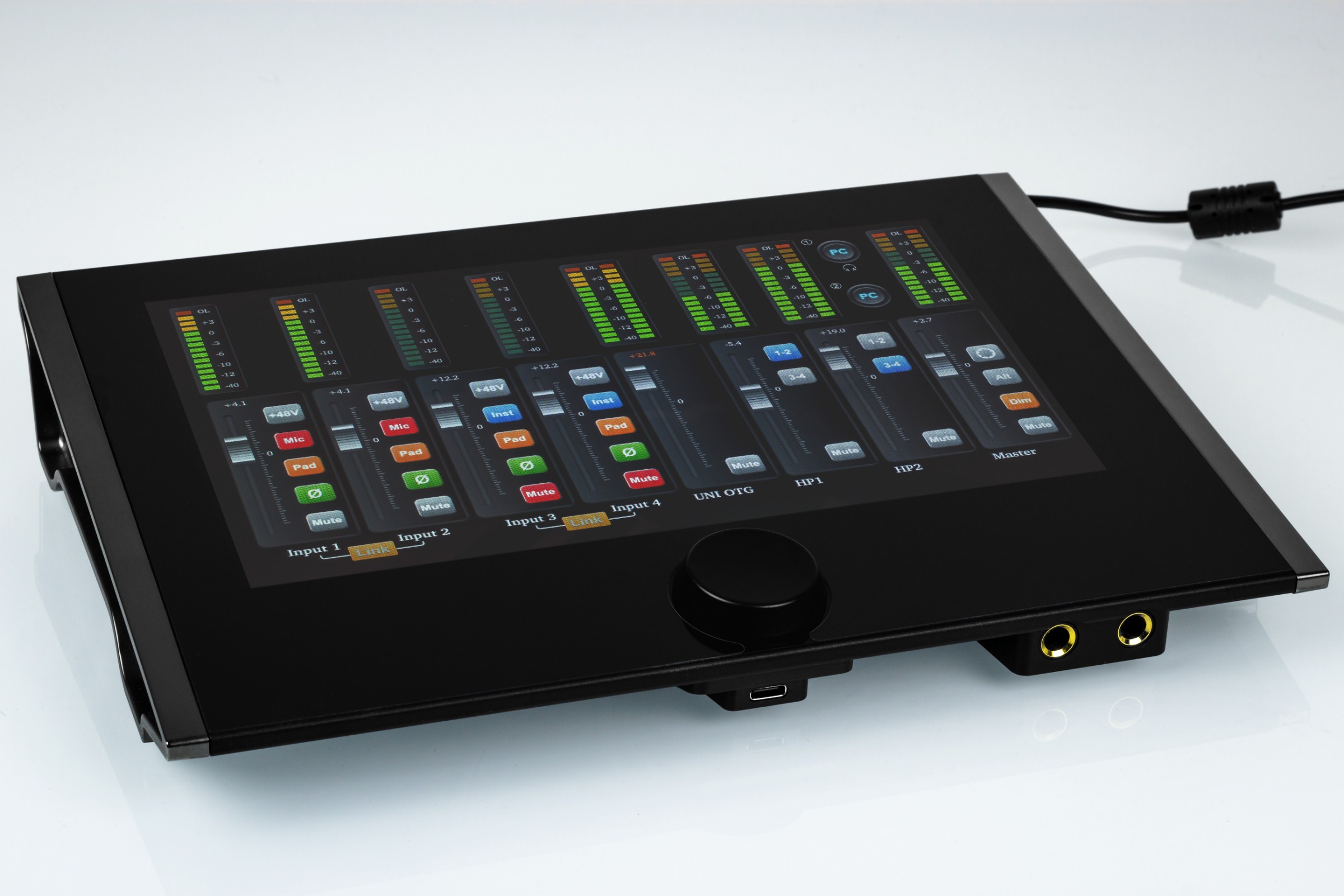
What does the colour touchscreen add? It turns the interface into a simple digital mixer. The controls feel responsive enough. A physical encoder below the display provides more precise adjustment of the last selected control. A dedicated button allows presets to be saved and recalled.
We noticed that the on-screen peak meters refresh only a few times per second. This feels slower than expected, although the meters still show signal levels clearly enough. We also found that the red OL overload indicator never lit, even during actual overload. We hope future firmware will address both points. At least the manufacturer provides a firmware update function.
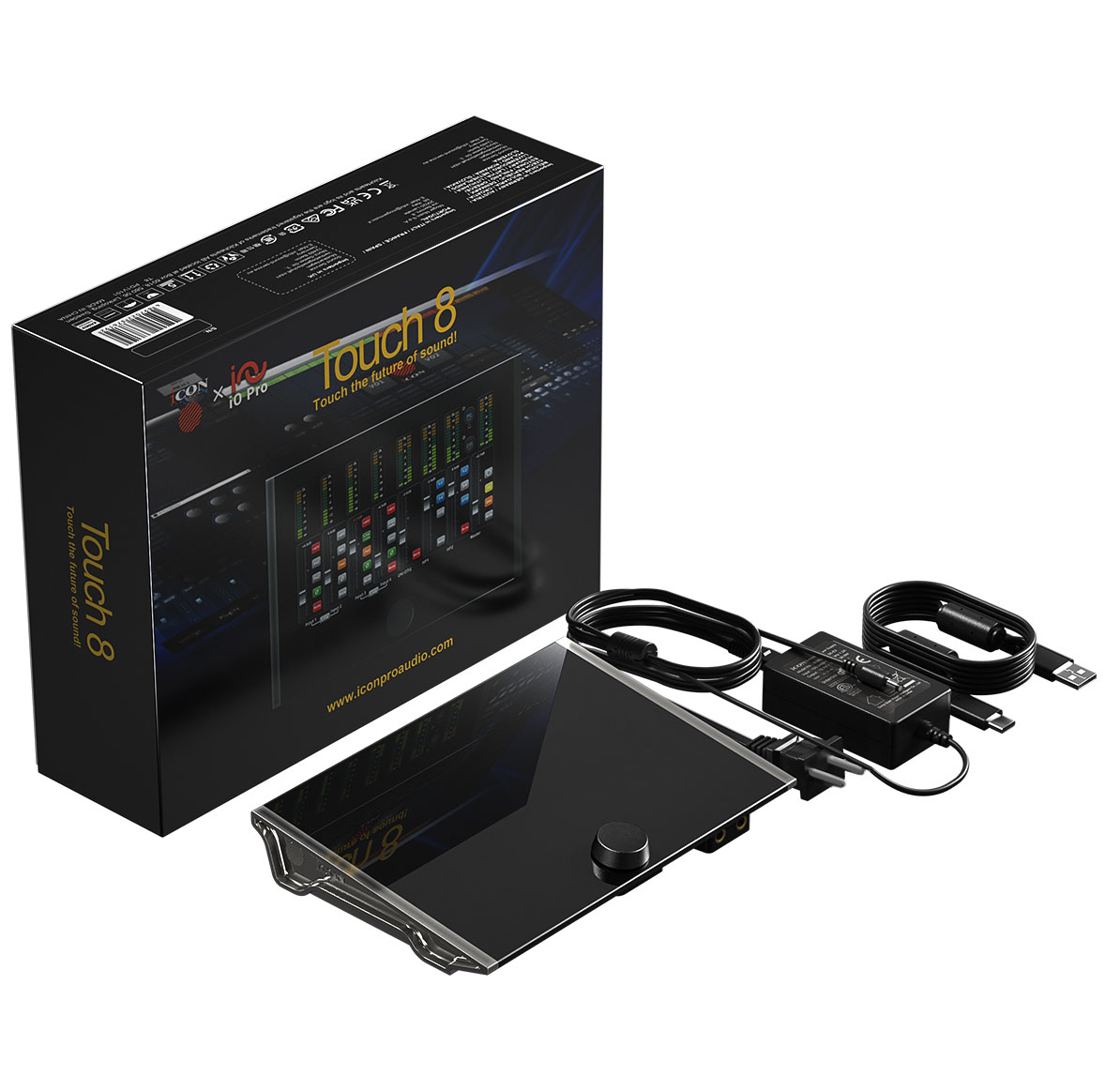
The package includes a +12 V power supply and two USB cables. The usual software bundle is also included: iZotope VEA, Harrison AVA Live, Harrison VIP, Bitwig 8-Track Studio DAW, Tracktion DAW Essentials, Kilohearts Toolbox and Dotec Audio Plugins.
Can the interface work without a computer as a standalone mixer? Yes, but this is not its best use because there are no onboard hardware effects. The system is mainly designed to work with a computer. As with other iCON interfaces, its mixer can apply bundled and third-party VST effects in real time.
The front panel has two independent headphone outputs with powerful amplifiers. This is a feature missing from many professional devices.
iCON Touch 8 specifications
| Parameter | Value |
| Inputs/outputs | |
| Microphone inputs: balanced XLR | 4 |
| Hi-Z guitar inputs | 4 |
| Analogue line inputs | 4 |
| Analogue line outputs | 4, in two pairs: Main and Alt |
| Word Clock IN | 1 |
| Word Clock OUT | 1 |
| Digital input | ADAT |
| Digital output | ADAT |
| Digital connector | USB OTG |
| ADC | |
| Dynamic range | 125 dBA |
| Signal-to-noise ratio | 125 dBA |
| THD+N | −117 dB, −1 dB |
| DAC | |
| Dynamic range | 130 dBA |
| Signal-to-noise ratio | 130 dBA |
| THD+N | −120 dB, −1 dB |
| Microphone input, balanced XLR | |
| Frequency response | 20 Hz–20 kHz (±0.1 dB) |
| Minimum gain | 0 dB, with −20 dB pad |
| Maximum gain | 75 dB, pad off |
| Input level | -16dBu -66dBu |
| Maximum level | +18dBu (-20dB pad) |
| 1/4-inch guitar input | |
| Frequency response | 20 Hz–20 kHz (±0.1 dB) |
| Impedance | 1 megohm |
| Maximum level | +18dBu (-20dB pad) |
| 1/4-inch line input | |
| Frequency response | 20 Hz–20 kHz (±0.1 dB) |
| Maximum level | +24dBu |
| Line output 1/2 | |
| Frequency response | 20 Hz–20 kHz (±0.1 dB) |
| Maximum level | +24dBu |
| Headphone amplifier | |
| Frequency response | 20 Hz–20 kHz (±0.1 dB) |
| Load impedance | 16–600 ohms |
| Maximum level | +21 dBu, no load |
| +21 dBu into 600 ohms (11.4 Vrms) | |
| +20 dBu into 100 ohms (10 Vrms) | |
| +14.6 dBu into 32 ohms (5.4 Vrms) | |
| +8.6 dBu into 16 ohms (2.7 Vrms) | |
As usual with iCON, the converter specifications are high. However, these figures describe the internal chips rather than measurements of the complete interface through its inputs and outputs. Unfortunately, the manufacturer does not publish those measurements. We measured the interface ourselves and provide the results later in this review.
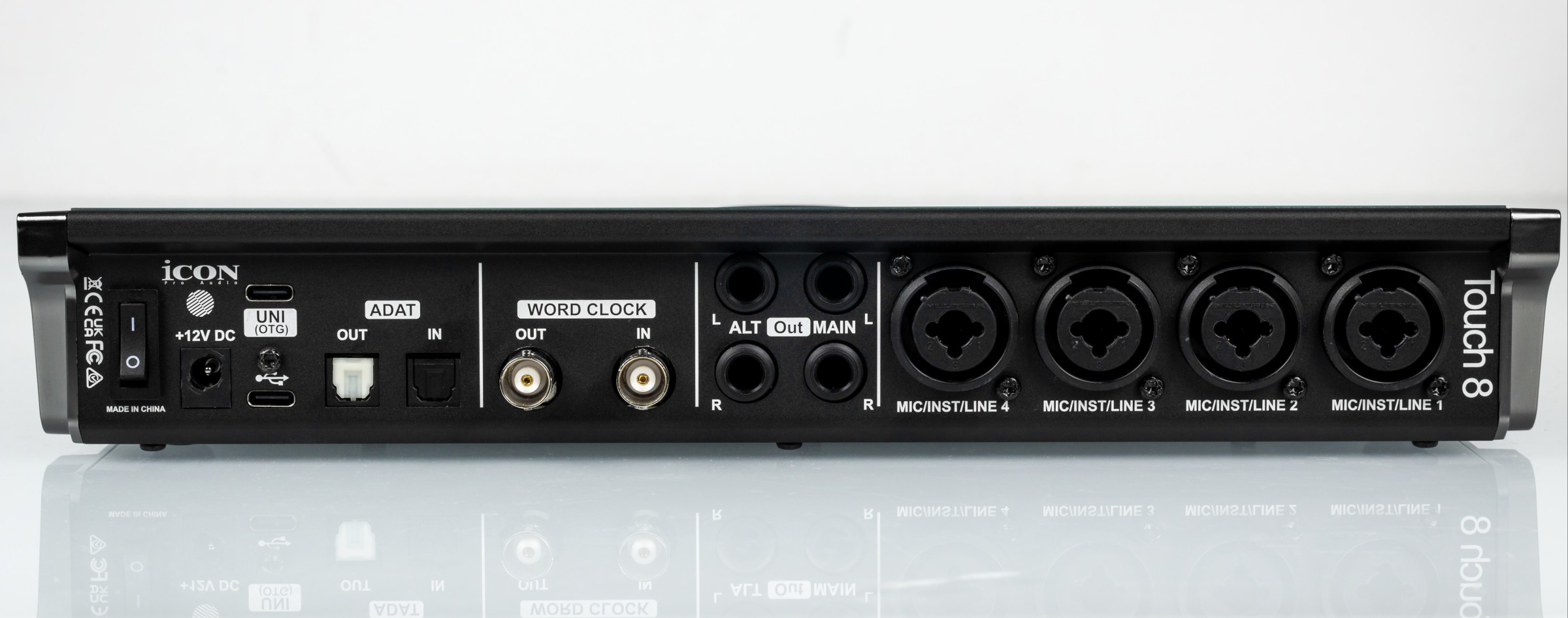
The analogue and digital connections are on the rear panel. Word clock is provided, showing that the manufacturer intends the interface for integration into commercial studios. We also liked the separate 12 V power connector with a twist lock. This prevents accidental disconnection due to vibration and helps make the unit suitable for important recording tasks.
The all-metal case becomes noticeably warm, but this is intentional. Thermal pads transfer heat from the electronics to the cover. We prefer this approach to ventilation holes that could admit dust, moisture and dirt.
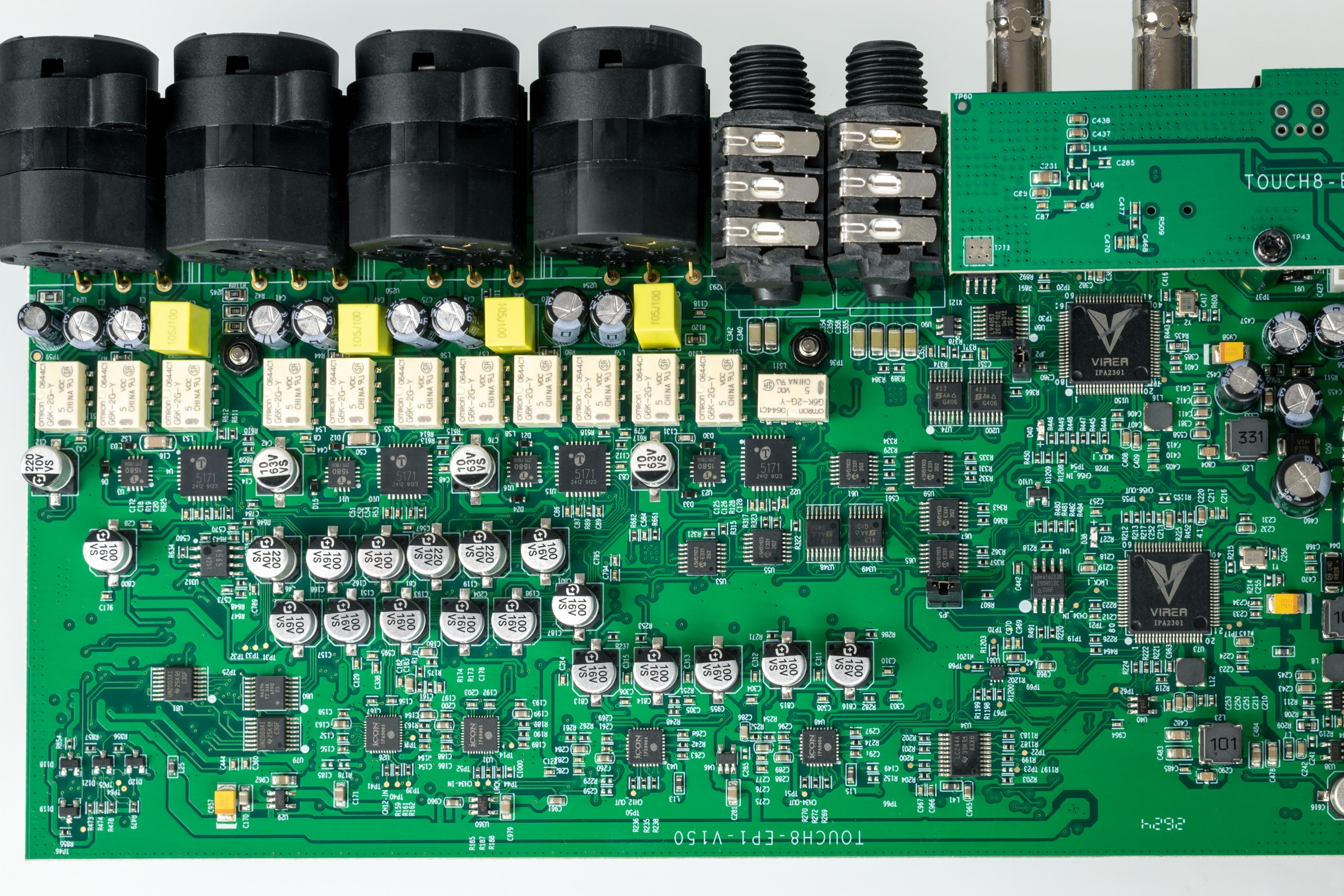
Two 500 MHz ARM Cortex-M7 processors serve the two USB-C connections, one processor per port. An ARM Cortex-A7 handles the touchscreen display.
The ADC and DAC chips carry iCON markings. Manufacturers often do this to make circuit copying more difficult. Based on other products, the chips may be the ESS ES9822PRO and ESS ES9028Q2M. The microphone preamps use well-known integrated chips from the American company THAT. The powerful headphone amplifier uses a TI TPA6120A.
ASIO diagnostics
Features:
Input channels: 16
Output channels: 16
Input latency: 421
Output latency: 421
Min buffer size: 32
Max buffer size: 4096
Preferred buffer size: 256
Granularity: -1
ASIOOutputReady - not supported
Sample rate:
8000 Hz - not supported
11025 Hz - not supported
16000 Hz - not supported
22050 Hz - not supported
32000 Hz - not supported
44100 Hz - supported
48000 Hz - supported
88200 Hz - supported
96000 Hz - supported
176400 Hz - supported
192000 Hz - supported
352800 Hz - not supported
384000 Hz - not supported
Input channels:
channel: 0 (HW In 1) - Int32LSB
channel: 1 (HW In 2) - Int32LSB
channel: 2 (OTG In 3) - Int32LSB
channel: 3 (OTG In 4) - Int32LSB
channel: 4 (VC In 1) - Int32LSB
channel: 5 (VC In 2) - Int32LSB
channel: 6 (VC In 3) - Int32LSB
channel: 7 (VC In 4) - Int32LSB
channel: 8 (VC Music In 5) - Int32LSB
channel: 9 (VC Music In 6) - Int32LSB
channel: 10 (Loopback 1) - Int32LSB
channel: 11 (Loopback 2) - Int32LSB
channel: 12 (Loopback 3) - Int32LSB
channel: 13 (Loopback 4) - Int32LSB
channel: 14 (Loopback 5) - Int32LSB
channel: 15 (Loopback 6) - Int32LSB
Output channels:
channel: 0 (HW Out 1) - Int32LSB
channel: 1 (HW Out 2) - Int32LSB
channel: 2 (OTG Out 3) - Int32LSB
channel: 3 (OTG Out 4) - Int32LSB
channel: 4 (VC Out 1) - Int32LSB
channel: 5 (VC Out 2) - Int32LSB
channel: 6 (VC Out 3) - Int32LSB
channel: 7 (VC Out 4) - Int32LSB
channel: 8 (VC Music Out 5) - Int32LSB
channel: 9 (VC Music Out 6) - Int32LSB
channel: 10 (Loopback 1) - Int32LSB
channel: 11 (Loopback 2) - Int32LSB
channel: 12 (Loopback 3) - Int32LSB
channel: 13 (Loopback 4) - Int32LSB
channel: 14 (Loopback 5) - Int32LSB
channel: 15 (Loopback 6) - Int32LSB
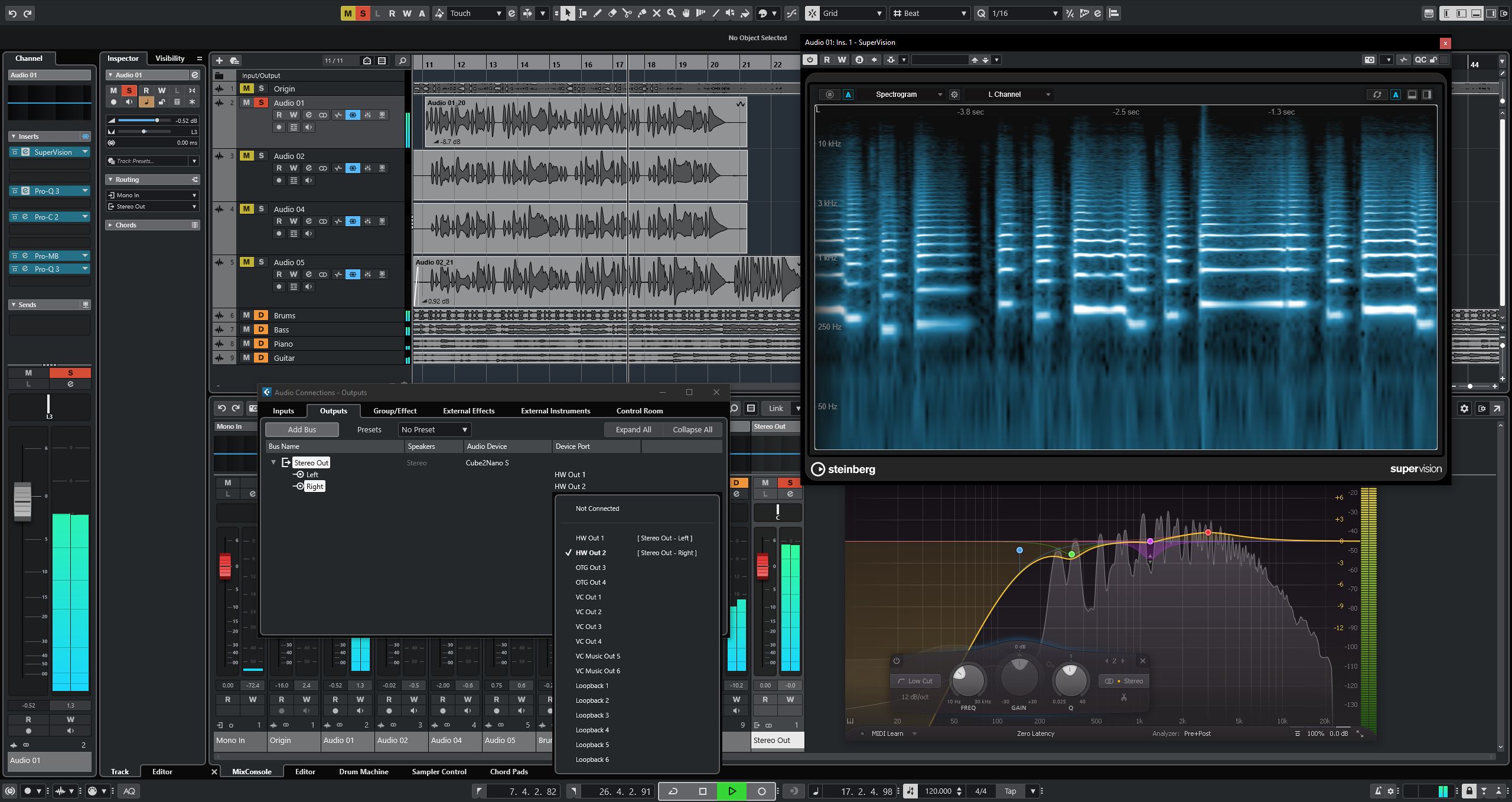
The ASIO driver supports sample rates up to 192 kHz. Six virtual inputs and six virtual outputs are available, which is useful for online streaming.
RMAA PRO measurements
We measured the balanced line output separately.
| Device under test | Icon Touch 8 |
| Operating mode | 32-bit, 44 kHz |
| Audio interface | ASIO |
| Signal path | Line output |
| RMAA version | 6.4.5 PRO |
| 20 Hz–20 kHz filter | YES |
| Signal normalisation | YES |
| Level change | −1.3 dB / −1.3 dB |
| Mono mode | NO |
| Calibration signal frequency, Hz | 1000 |
| Polarity | Correct/correct |
| Frequency response, 40 Hz–15 kHz, dB | +0.01, -0.22 |
Very good |
| Noise level, dB(A) | -119.0 |
Excellent |
| Dynamic range, dB(A) | 119.2 |
Excellent |
| Total harmonic distortion, % | 0.016 |
Good |
| THD + noise, dB(A) | -73.7 |
Average |
| Intermodulation distortion + noise, % | 0.016 |
Very good |
| Stereo crosstalk, dB | -117.4 |
Excellent |
| Intermodulation at 10 kHz, % | 0.024 |
Good |
| Overall result | Very good |
24-bit / 44 kHz measurements are provided on a separate page.
The figures are excellent, especially dynamic range. Distortion is higher than we usually see in iCON products. When we measured the input separately using a known high-quality source, those higher harmonics were absent. Input performance is therefore very good. The harmonics may result from signal summing in the internal hardware mixer. This could be a firmware issue that a future update will resolve.
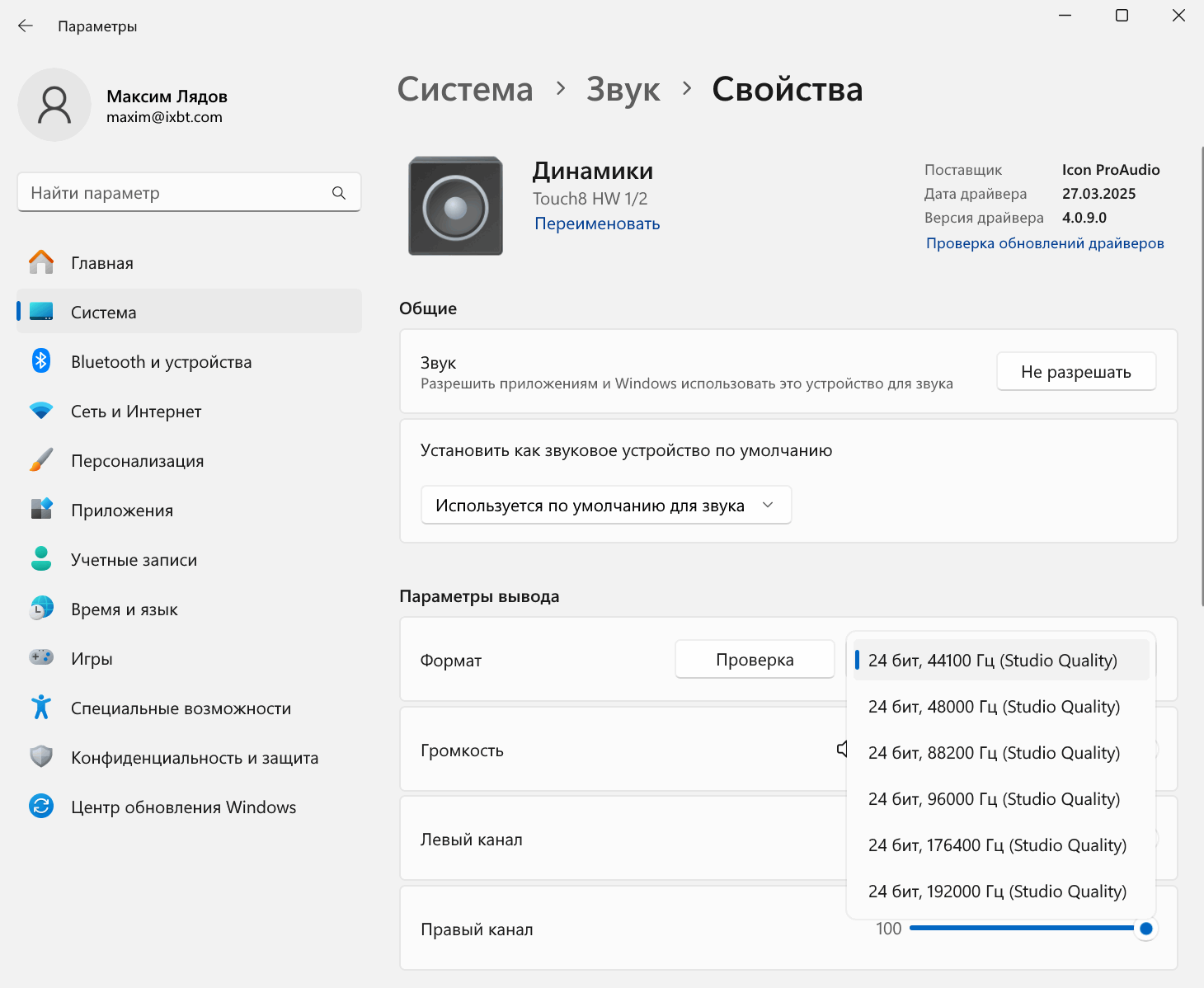
After the iCON Pro Driver is installed, Windows shows 10 audio devices. Four output pairs serve the 8 ADAT channels. Three pairs are VC virtual channels. The remaining devices are direct hardware paths that bypass the mixer: HW 1/2, HW 3/4 and OTG 5/6. The virtual channels make it easier to work with several applications. Each application's level and effects can be adjusted separately.
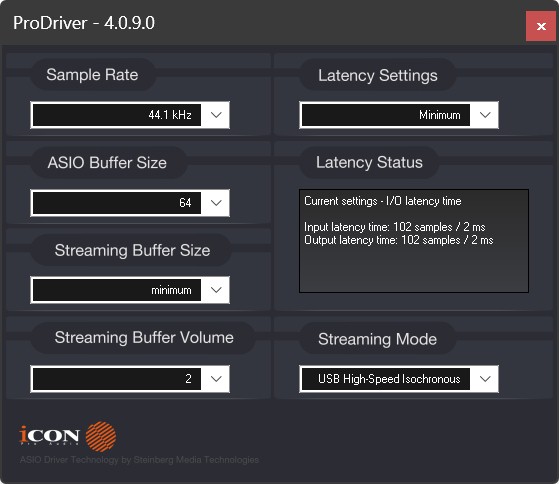
A separate settings window adjusts buffer size and shows latency in milliseconds.
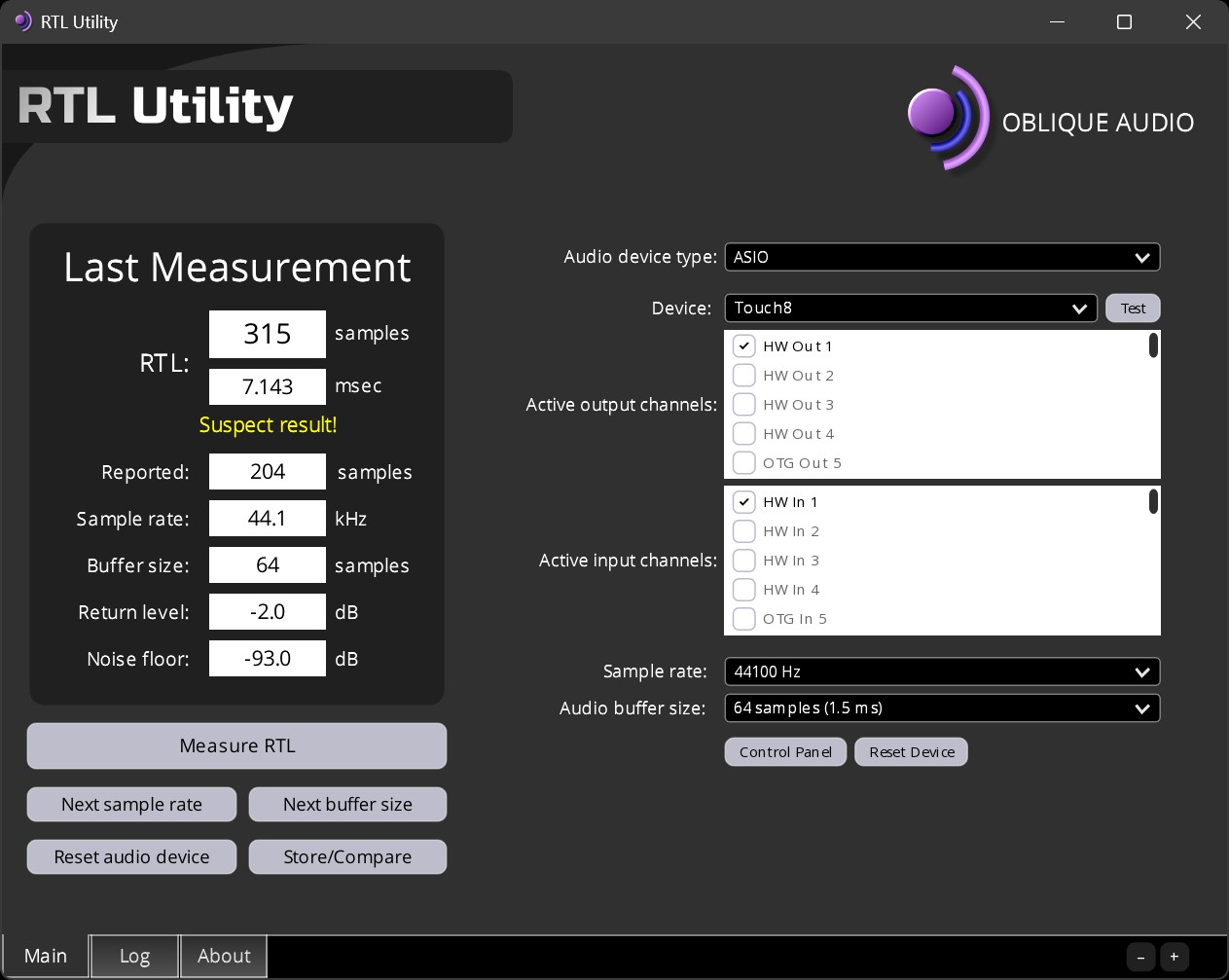
Round-trip latency is typical, at around 7 ms.
Features:
Input channels: 26
Output channels: 26
Input latency: 121
Output latency: 122
Min buffer size: 64
Max buffer size: 64
Preferred buffer size: 64
Granularity: 0
ASIOOutputReady - not supported
Sample rate:
8000 Hz - not supported
11025 Hz - not supported
16000 Hz - not supported
22050 Hz - not supported
32000 Hz - not supported
44100 Hz - supported
48000 Hz - supported
88200 Hz - supported
96000 Hz - supported
176400 Hz - supported
192000 Hz - supported
352800 Hz - not supported
384000 Hz - not supported
Input channels:
channel: 0 (HW In 1) - Int32LSB
channel: 1 (HW In 2) - Int32LSB
channel: 2 (HW In 3) - Int32LSB
channel: 3 (HW In 4) - Int32LSB
channel: 4 (OTG In 5) - Int32LSB
channel: 5 (OTG In 6) - Int32LSB
channel: 6 (Optical In 1) - Int32LSB
channel: 7 (Optical In 2) - Int32LSB
channel: 8 (Optical In 3) - Int32LSB
channel: 9 (Optical In 4) - Int32LSB
channel: 10 (Optical In 5) - Int32LSB
channel: 11 (Optical In 6) - Int32LSB
channel: 12 (Optical In 7) - Int32LSB
channel: 13 (Optical In 8) - Int32LSB
channel: 14 (VC In 1) - Int32LSB
channel: 15 (VC In 2) - Int32LSB
channel: 16 (VC In 3) - Int32LSB
channel: 17 (VC In 4) - Int32LSB
channel: 18 (VC Music In 5) - Int32LSB
channel: 19 (VC Music In 6) - Int32LSB
channel: 20 (Loopback 1) - Int32LSB
channel: 21 (Loopback 2) - Int32LSB
channel: 22 (Loopback 3) - Int32LSB
channel: 23 (Loopback 4) - Int32LSB
channel: 24 (Loopback 5) - Int32LSB
channel: 25 (Loopback 6) - Int32LSB
Output channels:
channel: 0 (HW Out 1) - Int32LSB
channel: 1 (HW Out 2) - Int32LSB
channel: 2 (HW Out 3) - Int32LSB
channel: 3 (HW Out 4) - Int32LSB
channel: 4 (OTG Out 5) - Int32LSB
channel: 5 (OTG Out 6) - Int32LSB
channel: 6 (Optical Out 1) - Int32LSB
channel: 7 (Optical Out 2) - Int32LSB
channel: 8 (Optical Out 3) - Int32LSB
channel: 9 (Optical Out 4) - Int32LSB
channel: 10 (Optical Out 5) - Int32LSB
channel: 11 (Optical Out 6) - Int32LSB
channel: 12 (Optical Out 7) - Int32LSB
channel: 13 (Optical Out 8) - Int32LSB
channel: 14 (VC Out 1) - Int32LSB
channel: 15 (VC Out 2) - Int32LSB
channel: 16 (VC Out 3) - Int32LSB
channel: 17 (VC Out 4) - Int32LSB
channel: 18 (VC Music Out 5) - Int32LSB
channel: 19 (VC Music Out 6) - Int32LSB
channel: 20 (Loopback 1) - Int32LSB
channel: 21 (Loopback 2) - Int32LSB
channel: 22 (Loopback 3) - Int32LSB
channel: 23 (Loopback 4) - Int32LSB
channel: 24 (Loopback 5) - Int32LSB
channel: 25 (Loopback 6) - Int32LSB
There are 26 recording and playback channels. All sample rates up to 192 kHz are supported.
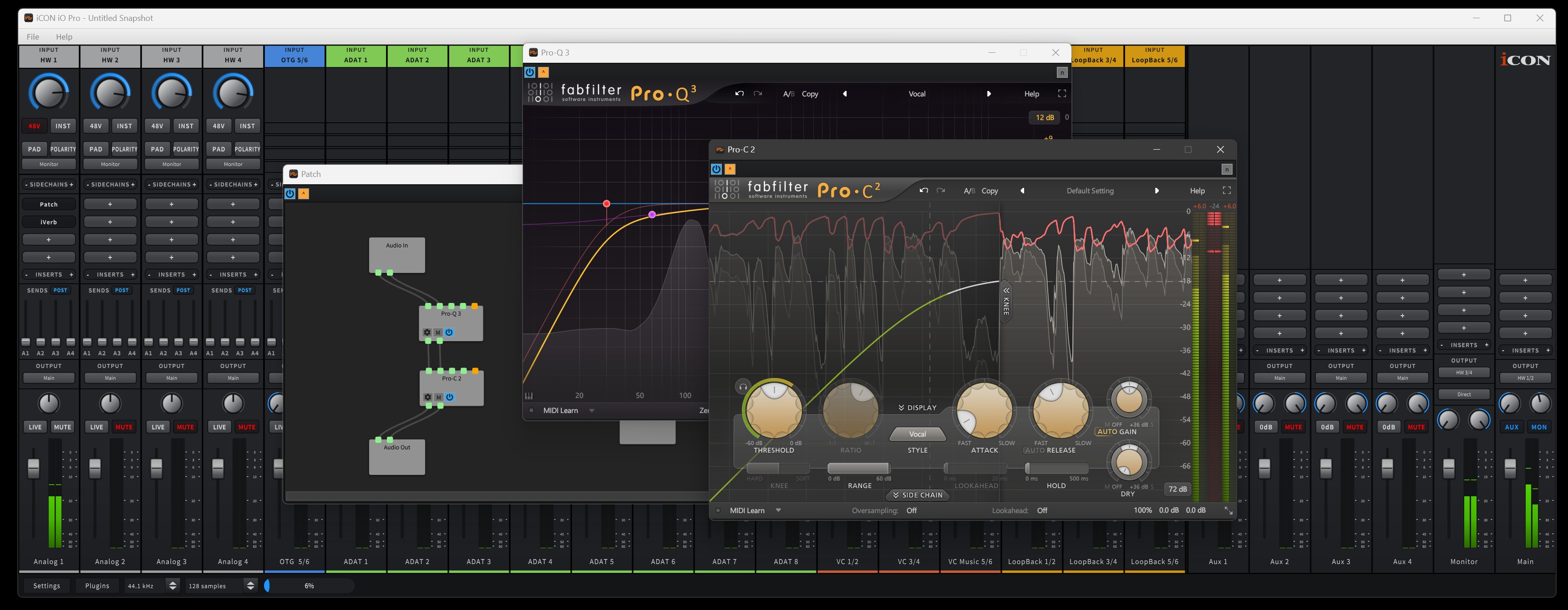
The iO Pro mixer comes from iCON's flagship interfaces and has many professional functions. These include four Aux buses for submixes from any physical analogue or digital input, or virtual application channel, and three loopback channels. Presets save all mixer settings and allow the required configuration to be recalled quickly. The scalable interface also makes the mixer usable at different screen resolutions without reducing the quality of the controls.
The mixer's main feature is the ability to apply any VST effect to any channel or bus. This is a distinctive feature of iCON interfaces that we have not seen from other manufacturers. A DAW can offer similar processing, but iCON makes it accessible to people who do not use professional audio software, such as streamers or beginner musicians. Users only need to open the mixer and insert an effect to process audio in real time.
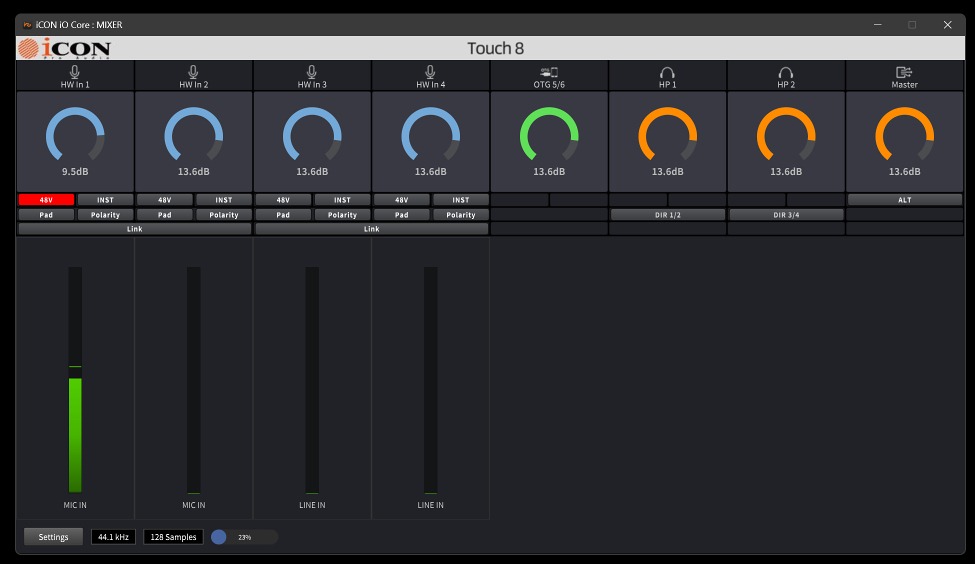
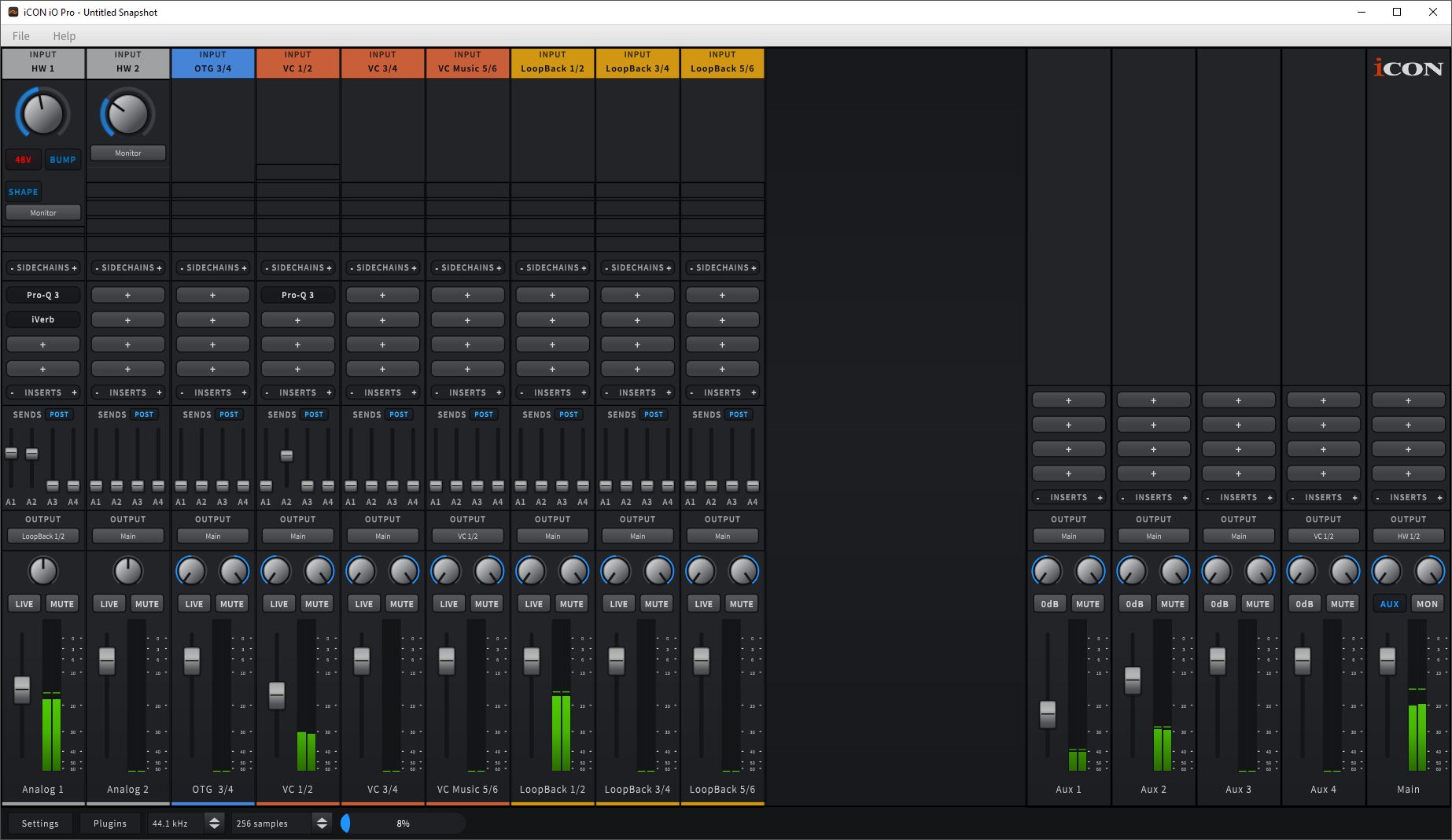
Another control panel repeats all settings from the touchscreen. Operation is the same: after moving a slider, you can adjust it with the hardware encoder below the display.
We connected a Neumann TLM102 and recorded speech. The microphone input provides high recording quality. As with other iCON devices, the recording has good detail and natural tone. A dynamic microphone also provided enough level, even for speech. The recorded sound is of very high quality.
The headphone output is very powerful. It feels louder than the outputs of other iCON interfaces. The specifications claim up to 900 mW, and our listening experience makes that figure believable.
Conclusions
The iCON Touch 8 is an unusual interface, with a built-in 10-inch screen for touch control of inputs and outputs. It is most useful when users need quick metering and channel or output level changes while the computer display is occupied with other work. This is where the touchscreen offers a real advantage. The physical encoder for adjusting on-screen sliders is also welcome. It allows a selected parameter to be changed without looking at the display.
In other respects, the Touch 8 is similar to iCON's other audio interfaces. Strengths include high-quality input and output converter chips, THAT preamp ICs, plenty of microphone gain and a powerful headphone output. We hope the issues found in our tests will be fixed in future firmware. Digital connections include ADAT I/O and word clock.
Note. This is an adapted machine translation into English. It follows the “In simple terms” approach. Read the original article at https://prosound.ixbt.com/interfaces/icon-touch8.shtml.