
Ableton Live 10 - a review of the popular DAW's tenth version
Grigory Liadov
Ableton Live 10 was announced in autumn 2017, but the full release arrived only now, in February 2018. Until then, many users around the world took part in beta testing. This is a major update focused mainly on ease of use. It adds many functions that make music creation easier, from simple interface color changes to the entirely new CAPTURE function.
All well-known music applications borrow useful and popular ideas from one another. This benefits the professional community: despite different concepts, users can work in several applications with familiar controls. However, these programs are still far from universal or interchangeable. Significant differences remain.
Most new Ableton Live 10 functions improve workflow and follow successful ideas from other DAWs. This does not make the update less interesting. Instead, it suggests that the developer understands users' needs and is taking the software in the right direction.
Let us look at Ableton Live 10 itself. As before, three editions are available: Intro, Standard and Suite. They differ in functions and price. The comparison table shows their main differences.
| Intro | Standard | Suite | |
| Price | $99 | $449 | $749 |
| Main functions and modes | 16 audio and MIDI tracks 8 scenes 2 sends and returns 4 mono inputs 4 mono outputs Capture |
Unlimited audio and MIDI tracks Unlimited scenes 12 sends and returns 256 mono inputs 256 mono outputs Capture Complex warp Audio-slicing Audio to MIDI |
Unlimited audio and MIDI tracks Unlimited scenes 12 sends and returns 256 mono inputs 256 mono outputs Capture Complex warp Audio-slicing Audio to MIDI Max for Live |
| Library | More than 5 GB and 1500 sounds | More than 10 GB and 1800 sounds | More than 70 GB and 5000 sounds |
| Software instruments | Drum Rack Impulse Instrument Rack Simpler |
Drum Rack Impulse Instrument Rack Simpler External Instrument |
Drum Rack Impulse Instrument Rack Simpler External Instrument Analog Collision DrumSynths Electric Operator Sampler Tension Wavetable |
| Audio effects | Audio Effect Rack Auto Filter Auto Pan Beat Repeat Chorus Compressor EQ Three Erosion Flanger Gate Grain Delay Limiter Looper Phaser Ping Pong Delay Redux Reverb Saturator Simple Delay Tuner Utility |
Audio Effect Rack Auto Filter Auto Pan Beat Repeat Chorus Compressor EQ Three Erosion External Audio Effect Flanger Gate Grain Delay Limiter Looper Phaser Ping Pong Delay Redux Reverb Saturator Simple Delay Tuner Utility Drum Buss Dynamic Tube EQ Eight Filter Delay Frequency Shifter Glue Compressor Multi-band Dynamics Overdrive Resonators Spectrum Vinyl Distortion Vocoder |
Audio Effect Rack Auto Filter Auto Pan Beat Repeat Chorus Compressor Convolution Reverb EQ Three Erosion External Audio Effect Flanger Gate Grain Delay Limiter Looper Phaser Ping Pong Delay Redux Reverb Saturator Simple Delay Tuner Utility Drum Buss Dynamic Tube EQ Eight Filter Delay Frequency Shifter Glue Compressor Multi-band Dynamics Multichannel Audio Overdrive Resonators Spectrum Vinyl Distortion Vocoder Amp Cabinet Corpus Echo Pedal |
| MIDI effects | Arpeggiator Chord MIDI Effect Rack Note Length Pitch Random Scale Velocity |
Arpeggiator Chord MIDI Effect Rack Note Length Pitch Random Scale Velocity |
Arpeggiator Chord MIDI Effect Rack Note Length Pitch Random Scale Velocity Envelope Envelope Follower Expression Control LFO MIDI Monitor Note Echo Shaper |
Starting with Live 10, Ableton has dropped all 32-bit editions, including the limited Intro version. This relates to the operating system's 4 GB memory limit for 32-bit applications. Exceeding that limit causes the application to crash. We suspect the manufacturer wanted to stop repeated support requests about this issue and therefore ended 32-bit support. For exclusive or older 32-bit plugins in the 64-bit application, Ableton recommends adapters such as jBridge or 32 Lives.

The design changes are worth mentioning first. Arrangement View benefits particularly strongly. Ableton Live 10 now looks more like a traditional sequencer, with familiar group and track displays. Automation is hidden by default and is shown for all tracks with a separate command. Fade In and Fade Out, by contrast, are always available for each audio clip and can be edited in the usual way.
Other interesting changes include the new Ableton Sans font, new interface color themes and a wider choice of track colors. Incorrect scaling on ultra-high-resolution displays has also been fixed.

Automation projects are more flexible to work with. Navigation is much improved, including familiar zoom and track scrolling options. Several MIDI tracks can be edited together. Dragging part of a MIDI or audio track into an empty area creates an identical track with the same effects and automation. These useful functions have finally reached Ableton Live 10.
The new Capture function records MIDI events played on a controller and imports them into the project in sync with its tempo. The video clearly demonstrates what Capture can do.
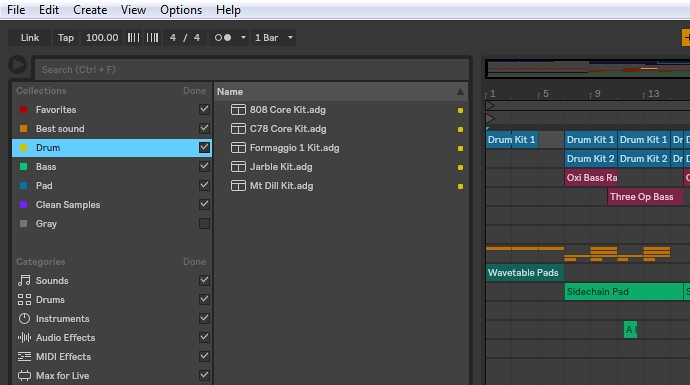
The new Collections menu at the upper left offers up to seven user categories for quick access to samples, instruments, effects and folders. Previously, the program had no rating or user sorting system. Colored labels now group important and frequently used effects, samples and instruments. This is especially useful as the amount of material and the number of tools continue to grow.
The main sound library has been reorganized and updated, with new instruments and packs. Standard and higher editions gain Drum Essentials, while Suite adds Synth Essentials, Drum Booth and Electric Keyboards. Curated Collections includes Chop and Swing for Intro and higher, Skitter and Step for Standard and higher, and Build and Drop, Glitch and Wash, Drive and Glow, and Punch and Tilt for Suite. Packs can now be installed and updated directly in Ableton Live.
Max for Live is now fully integrated, requiring no separate installation. Effect Envelope Follower, LFO and Shaper are always available among its effects, alongside the DS drum instrument series.

Several new instruments are included. Ableton's own Wavetable synthesizer uses two adjustable oscillators with many waveforms and an additional sub-oscillator. Its simple, clear parameter controls, interesting filters and modulation matrix are particularly appealing. Audio examples are available on the manufacturer's website.
Three new effects have also been added.
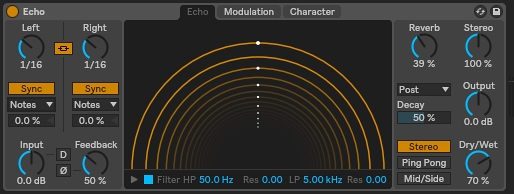
Echo models classic analog and digital hardware delays. Its many extra controls and settings allow creative uses.
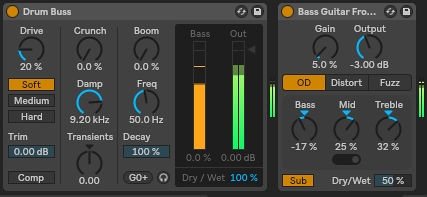
Drum Buss is a dedicated drum compressor that adds harmonic saturation, including in the bass region. Pedal models guitar pedals with characteristic Overdrive, Distortion and Fuzz sounds. Audio examples of all processing options in the new effects are available on the manufacturer's website.
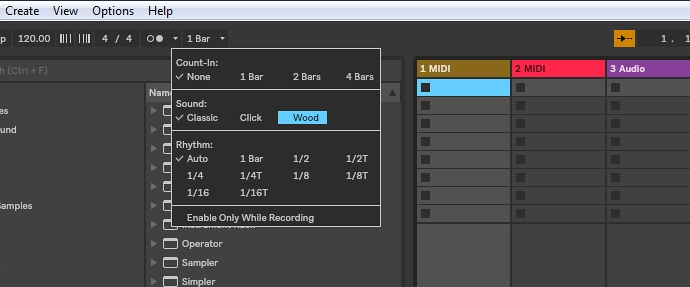
Metronome functions have expanded. Its context menu now changes the sound and beat count, and a new mode runs the metronome only during recording.
Other useful changes include renaming hardware audio inputs and outputs, long-awaited MP3 and FLAC export, keeping undo history after saving a project, and manual project backups when saving. Large projects open several times faster thanks to optimized sample and graphics loading. Many new functions are also available through the dedicated Ableton Push 2. The Convert button now converts audio to MIDI. Users can assign browser color labels to root folders, move a track with one hand and use Split Stereo Pan Mode. Live's instruments, including Wavetable and the new effects, gain visual displays. A new sequencer view, loop switching and many other functions have also been added.
Conclusions
We have covered only some of the changes in Ableton Live 10, focusing on the most significant. Overall, it is an interesting update aimed mainly at making music creation easier and more convenient. Alongside many small improvements, Live 10 adds long-awaited Max for Live integration, an updated library, new effects and instruments, and the excellent Capture function.
Ableton Live 10 remains the most popular and accessible application, with unique high-quality functions for music creation and live performance. This update strengthens its position as a professional DAW. Readers who have not tried Ableton Live 10 and want to experience its unusual workflow can use a fully functional 30-day trial.
Note. This is an adapted machine translation into English. It follows the "In simple terms" approach. Read the original article at https://prosound.ixbt.com/soft/ableton-live10.shtml.