
Arturia KeyLab 61 Essential and KeyLab 49 Essential - updated MIDI keyboards for Analog Lab
Grigory Liadov
In 2017, Arturia added two interesting models to its KeyLab MIDI keyboard range: KeyLab 49 Essential and KeyLab 61 Essential. They expand the controller range for Arturia software and aim to make music creation easier.
As before, KeyLab keyboards are primarily designed for the Arturia Analog Lab virtual instrument. Analog Lab is a powerful tool that emulates classic analog synthesizers. It includes more than 6000 presets from instruments such as Mini Moog, CS-80, ARP 2600, Prophet, SEM, Jupiter-8, Wurlitzer, Matrix-12 and VOX. All instruments share one graphical interface with a small set of adjustable settings. The keyboards provide controls for convenient access to these parameters.

With the new KeyLab Essential models, Arturia has tried to make Analog Lab use even easier and more productive. The controls have a more comfortable layout and new functions. The KeyLab 61 Essential and KeyLab 49 Essential differ only in their number of keys. Otherwise, they are identical.

The Essential models follow the design of Arturia's recent instruments. Controls look neater and are placed much more conveniently. As usual, black and white finishes are available.
Eight global presets provide different control assignments for music applications. The first, Analog Lab, works with Analog Lab. The second, DAW, controls a sequencer. The remaining six store user configurations created in the separate MIDI Control Center application.
We are mainly interested in how the keyboard works with Analog Lab. We also want to see what its controls do in DAW mode.
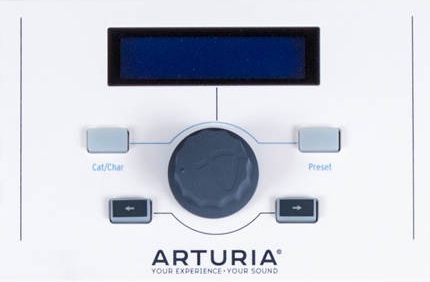
The display is now in the center, with a large knob for quick preset browsing. Buttons can still move between adjacent presets. The screen shows the selected instrument and the parameter being adjusted.
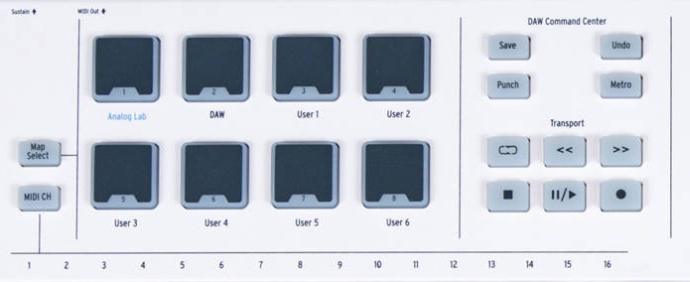
KeyLab Essential pads respond to velocity and pressure. By default, they send standard MIDI commands commonly used by virtual drum instruments. Arturia MIDI Control Center can reassign them to other MIDI parameters or notes.
Hold Map Select and use the pads to change the global preset instantly. MIDI Channel and the corresponding key quickly change the keyboard's MIDI channel. These functions are visible rather than hidden in menus, which is important when changing channels or modes during work with large projects, external synthesizers and modules.
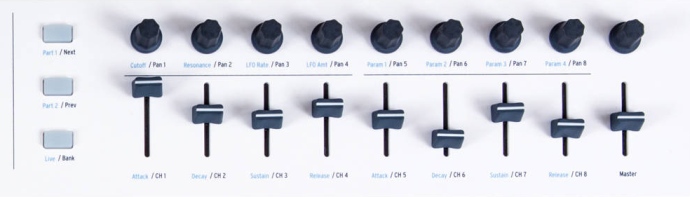
In Analog Lab mode, faders and endless knobs control the corresponding parameters of the displayed instrument. In DAW mode, they adjust pan and level for the first eight mixer channels. User presets can assign other parameters.
Separate buttons provide quick access to Analog Lab's multitimbral functions. Part 1 and Part 2 select the corresponding tabs. Live controls the exposed MACRO parameters, volume, pan and effect sends. In DAW mode, these buttons move between mixer channels. Bank changes whether movement is by one channel or by eight.
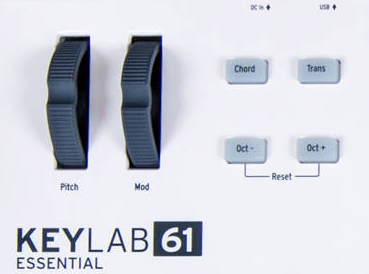
Chord mode is an interesting feature. Hold Chord and play the required chord, then release the button. The chord can now be played with one key. It can contain ten different notes and stays in memory until replaced or until power is switched off.

USB connects the keyboards to a computer and supplies bus power. Using them with external synthesizers requires a separate power supply, which is not included. A MIDI output and a sustain pedal socket are also provided.
The Arturia KeyLab Essential package includes Analog Lab, Ableton Live Lite and UVI Grand Piano Model D. We discussed these in detail in earlier reviews of Arturia products.
The KeyLab Essential uses an ordinary velocity-sensitive synth-action keyboard. Overall, the action is decent and typical of this class.
Conclusions
The new Arturia KeyLab Essential MIDI keyboards are a useful addition that makes work much easier for Arturia virtual instrument users. Compared with the standard KeyLab models, Essential offers better Analog Lab library control and DAW integration. Fewer onboard controls also make the keyboards more compact.
Note. This is an adapted machine translation into English. It follows the "In simple terms" approach. Read the original article at https://prosound.ixbt.com/keyboards/arturia-keylab-61es.shtml.