
Gemini GMX: two-channel standalone DJ controller
We continue exploring products from Gemini with the Gemini GMX two-channel DJ system. Earlier, we reviewed the standalone Gemini CDM-4000BTDJ system with CD drives. Today's GMX is a more compact and versatile device in the form of a conventional controller.

Gemini GMX is an inexpensive device aimed at a broad audience. It offers modern Virtual DJ controls and can also play directly from a USB drive.
The controller handles two sources/decks and is fairly large for its feature set. This leaves room for many controls, jog wheels, and a separate display for each channel.
A built-in USB2.0 audio interface with a full ASIO driver supports DJ applications. The controller includes the limited Virtual DJ LE software.
Unfortunately, the manufacturer gives no technical specifications for the controller, so we have no converter performance data. However, this is not a major concern: GMX sounds roughly on a level with comparable inexpensive controllers.

Full balanced XLR connections are provided, along with additional RCA outputs. These duplicate the Main output signal, but BOOTH has its own level control. A USB Type-B port connects to a computer. A second port acts as a USB hub. The controller requires external power, and a suitable 15 V adapter is supplied.

On the opposite side, a TRS socket accepts a dynamic microphone. Two headphone sockets support full-size TRS and mini-jack plugs. Headphone level is adjusted in the mixer section; microphone sensitivity is adjusted beside its connector. A recess protects these sockets during energetic use and transport.
The case is entirely plastic, keeping the total weight to 2.47 kg.

GMX has a familiar control layout. The main difference is the pads: they sit above the jog wheels rather than below. Almost all other buttons and faders are arranged symmetrically.
The monochrome displays have a 6 cm diagonal. They clearly show the track waveform, name, and playback time. Other useful information includes pitch-fader range, BPM, and active modes. BPM can come from the track's ID3 tag, automatic detection, or manual entry.
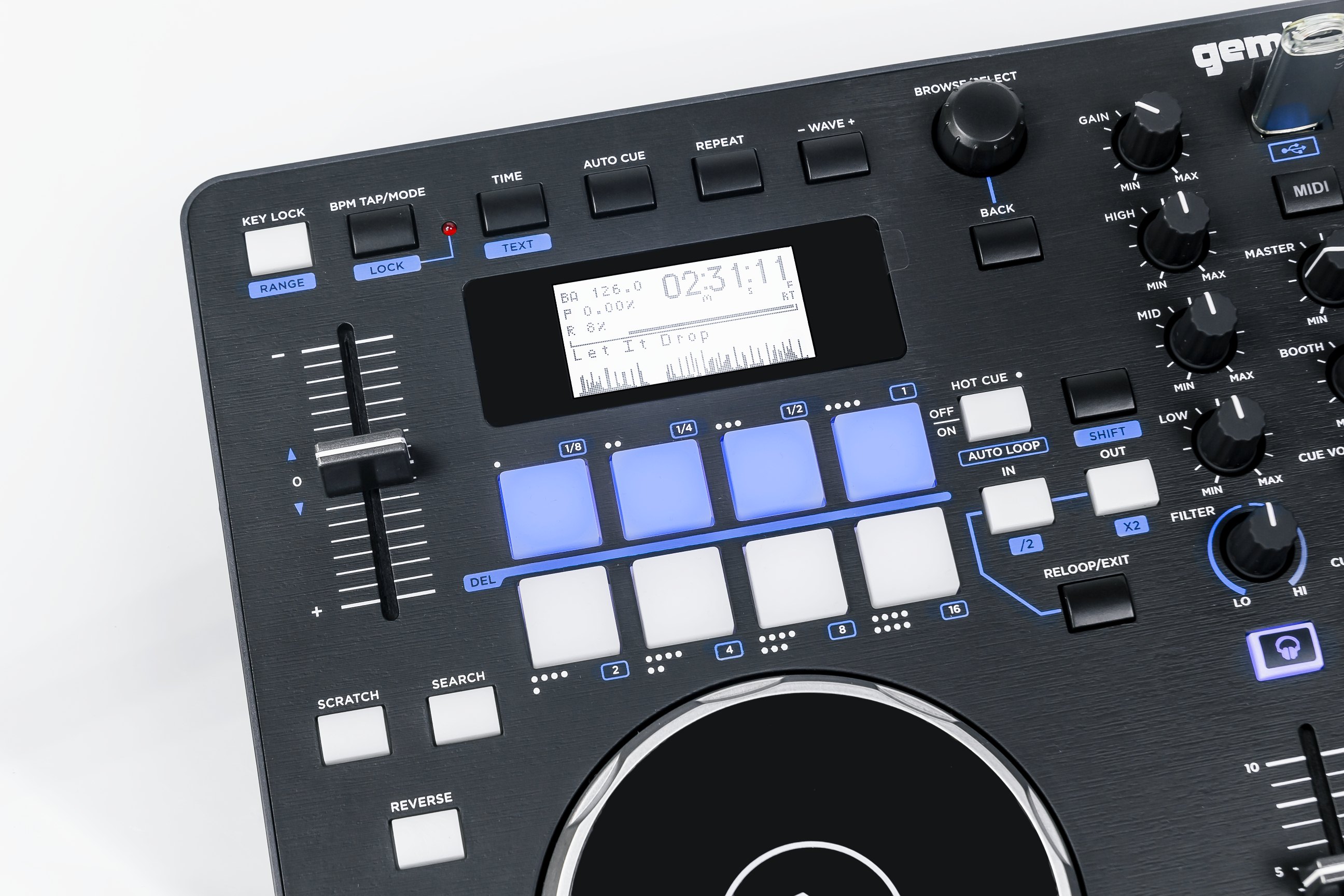
Each deck's BROWSER knob navigates the collection and selects tracks. Black buttons above the display zoom the waveform, enable track or folder repeat, set automatic CUE at the track start, and switch between elapsed and remaining time.
All light-colored buttons have blue backlighting to show the active mode. They are hard plastic and click when pressed. The pads are different: rubber surfaces resemble MIDI keyboard pads. They set hot cues or trigger loops of the lengths printed in blue above them. Conventional LOOP IN and LOOP OUT buttons also set loop start and end points.
As expected on a complete DJ system, GMX has an adjustable pitch-fader range. Four settings change playback speed by ±4%, ±8%, ±16%, or ±24%. Key lock is also available when changing tempo.

The mixer section has a three-band equalizer and gain control. There are no hardware effects, but each channel has a filter control. The center section controls Master, BOOTH, headphone level, and the balance between cue and main signals.


A level meter sits beside the faders. It shows either the master output (MSTR) or cue signal (CUE). A labeled switch above the meter selects the mode. No numerical level markings are provided, but the top two LEDs are red to warn of approaching overload.
The jog wheels have a relatively low, Vestax-style profile. Recesses around the sides improve grip and precision, although the wheels turn quite freely.

The jogs have two conventional modes selected by SEARCH and SCRATCH. SEARCH moves quickly through a track; SCRATCH enables scratching.
What are GMX's advantages? First, it can work entirely standalone. At the time of this review, comparable budget controllers do not offer this, making GMX unusual. We mean inexpensive products: high-end flagship systems have long supported computer-free operation. Otherwise, GMX resembles other affordable controllers. Balanced XLR outputs, a microphone input, and a USB hub are useful additions. With no specialized software-specific controls, it has no clear advantage in a particular DJ application. For beginners, however, the bundled Virtual DJ is a reasonable starting point.
Note. This is an adapted machine translation into English. It follows the “In simple terms” approach. Read the original article at https://prosound.ixbt.com/dj/gemini-gmx.shtml.